A start date tells you when you plan to begin a task. A due date tells you when the result must be ready. Use both when a delivery needs preparation: keep the delivery deadline visible, then schedule the work that must happen before it. Moving a work session does not automatically change an agreed deadline.
“Send the proposal on Friday” captures a promise, but it leaves Tuesday’s work undefined. If every preparation step is also dated Friday, you may discover missing requirements or an unchecked quote just when you need to send the file.
What does each date mean?
The start date answers “When will I begin moving this forward?” The due date answers “When does the finished result need to be available?” They can fall on the same day or several days apart, depending on the work, the information you are waiting for, and the checks required.
You do not need a deadline on every task. “Collect useful proposal examples” can remain unscheduled until it becomes relevant. “Send the agreed proposal to the client on Friday” has a delivery constraint. If you know the deadline but have not planned the work yet, record the deadline first and make room for preparation next.
| Situation | Start date | Due date |
|---|---|---|
| Chosen workday, no delivery promise | Set the planned workday | Optional |
| Only the deadline is known | Check the added today date; adjust to the planned start | Record the real deadline first |
| Delivery needs preparation | Choose from the preparation plan | Keep the agreed delivery date |
Work backward from a Friday delivery
For a proposal due Friday, October 30, create “Deliver client proposal” in TodoNote. Set the start date to Tuesday, October 27, and the due date to October 30. In the note, define the result: a checked PDF with pricing that matches the confirmed scope.
Schedule three subtasks: confirm requirements on Tuesday, write the draft on Wednesday, and check pricing and attachments on Thursday. The board shows the preparation dates; the parent task retains Friday’s delivery requirement. This is a plan for which day to move each step forward, rather than an hourly calendar.
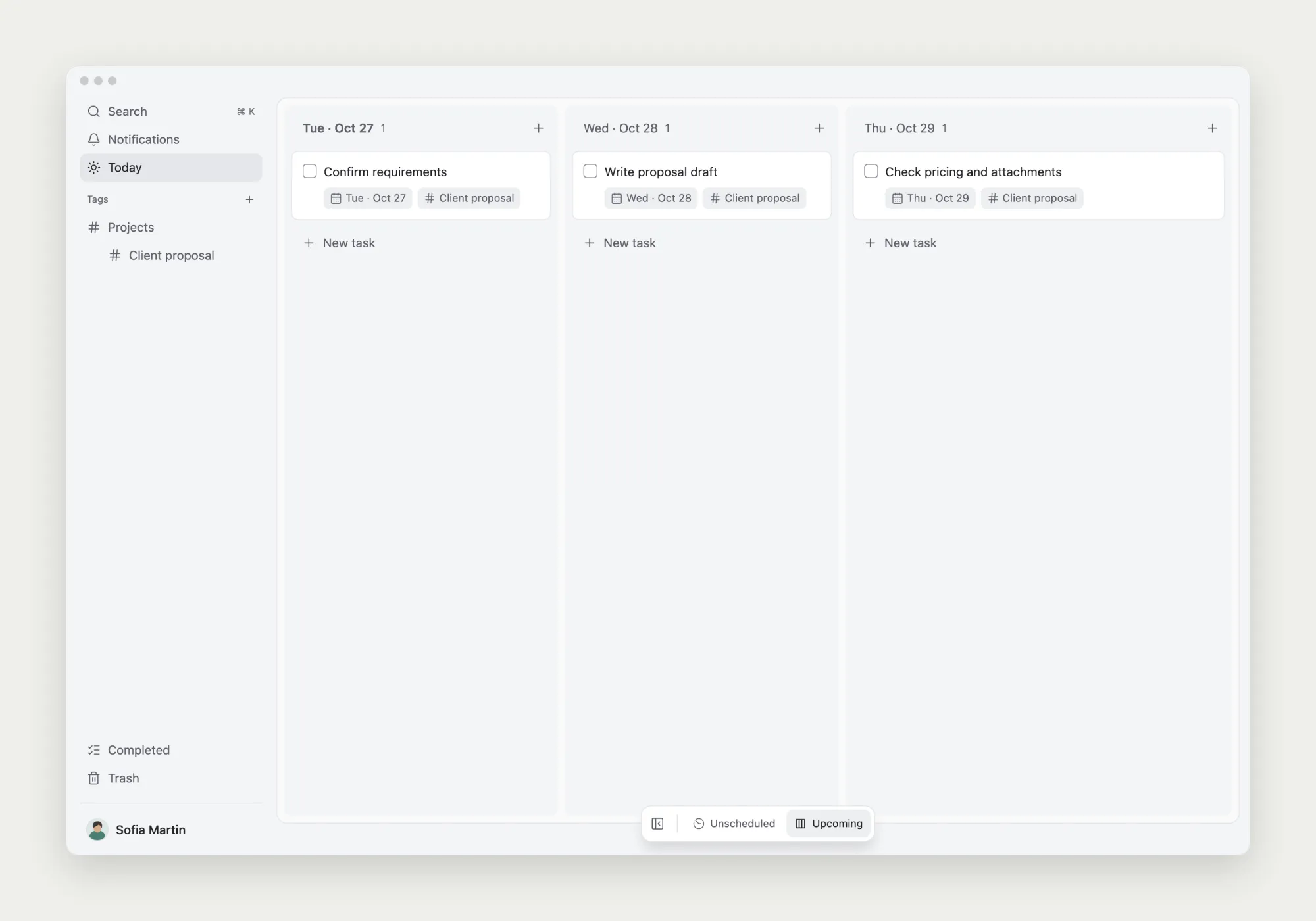
Check the sequence as well as the dates. You can draft confirmed sections while waiting for a scope answer, marking the unresolved parts in the note. Pricing review needs a usable draft. Putting it on Thursday does not make the earlier inputs arrive on time.
When does a task need a deadline?
Use only a start date when you have chosen a workday without a separate delivery commitment. Add a due date when there is a real completion requirement. In TodoNote, choosing a due date without an existing start date also sets the start to today. Check that date and change it to your actual planned start. Maintain both dates to keep the work plan and delivery requirement visible.
A date alone says little about effort. Wednesday’s draft still has to fit around meetings and other commitments. If you need a protected session, reserve it in the calendar you use. Assigning a date in a task list does not reserve an entire free day.
Keep the reason for the schedule in the note
Useful planning context includes the deliverable, inputs already available, missing information, and the next place to continue. Keep that information in the task note so a change of date has a clear meaning.
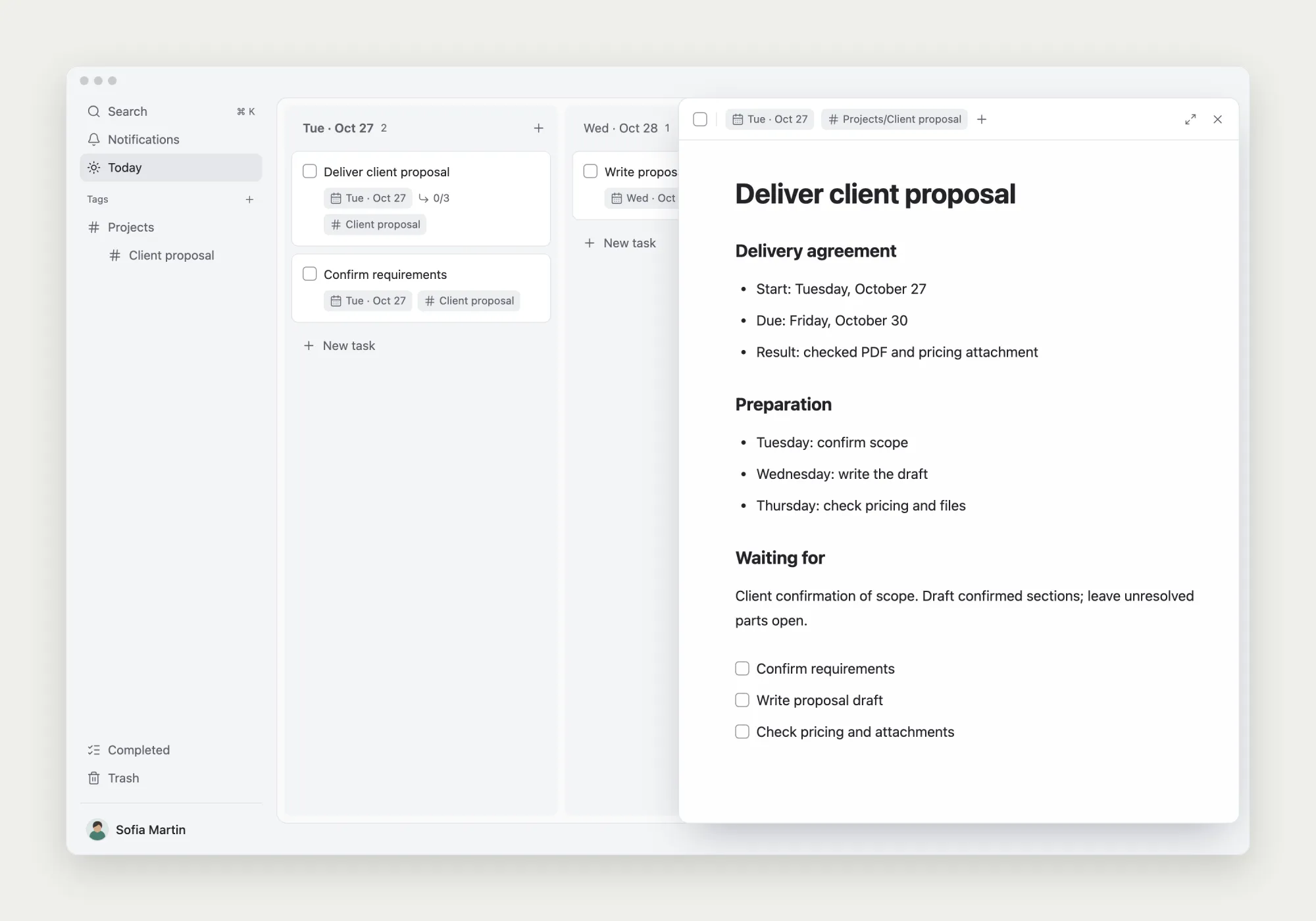
Here, the note preserves the Friday delivery requirement and Thursday’s pricing check. Use the same questions for your own work, choosing dates from your actual commitments and available time.
What should move when the work starts late?
Suppose the requirements arrive on Wednesday. First check what remains: which sections can be finished, when pricing can be confirmed, and whether there is still time for a final review. Then adjust the start date or the individual preparation steps and leave a brief explanation with the next action.
Keep the agreed Friday due date until you have discussed a different deadline or a smaller deliverable. Moving it to Monday merely to clear an overdue indicator would hide the original commitment. Review dependent steps individually; changing one date is not evidence that the rest of the plan still works.
For a self-selected work date without an external deadline, reschedule according to current priorities. If the same task keeps moving, look for an unclear result, missing input, or work you no longer need. A new date alone cannot resolve those problems.
Start with one real commitment
Write down the delivery date, then work backward through the preparation and final check. Schedule the next useful step and keep the delivery requirements in the note. Your daily list can then tell you both what to do and why it needs attention now.
Further reading: Todoist’s guide to dates and deadlines makes a related distinction. Field names and behavior differ across tools; the example here uses TodoNote’s start and due dates.