Meeting minutes lead to action when they distinguish discussion, confirmed decisions, and open questions, then turn commitments into specific next steps. Each action should identify who will do it, what they will deliver, when it is needed, and where its context lives. Schedule the execution and follow-up work you own after the meeting.
“Discussed the product page; continue improving it” records a topic but leaves the next move unclear. Start with what was decided, what remains unresolved, and who needs to do what. Add only the background needed to understand those points.
Separate discussion from a decision
In a client product-page review, the first version is agreed to include a product introduction and a contact entry point. The client still needs to choose between a form and an email link. A customer-stories section was suggested but not approved. Those are three different kinds of record.
For a confirmed decision, capture scope and constraints. For an open question, record who can answer and what depends on it. Keep an unaccepted idea in the discussion record; create work for it when there is an actual commitment to investigate or validate it.
Do not turn “we could add customer stories” into “add a customer-stories section” while tidying the notes. Check the original record or ask participants when a decision is unclear. Leave it open until it is confirmed.
Replace “follow up” with an action someone can finish
A useful action names both the starting point and the result. “Follow up with the client” becomes “Confirm form or email for the contact entry and record the reply in the review note.” A wireframe revision can specify the two agreed sections and flag anything still undecided.
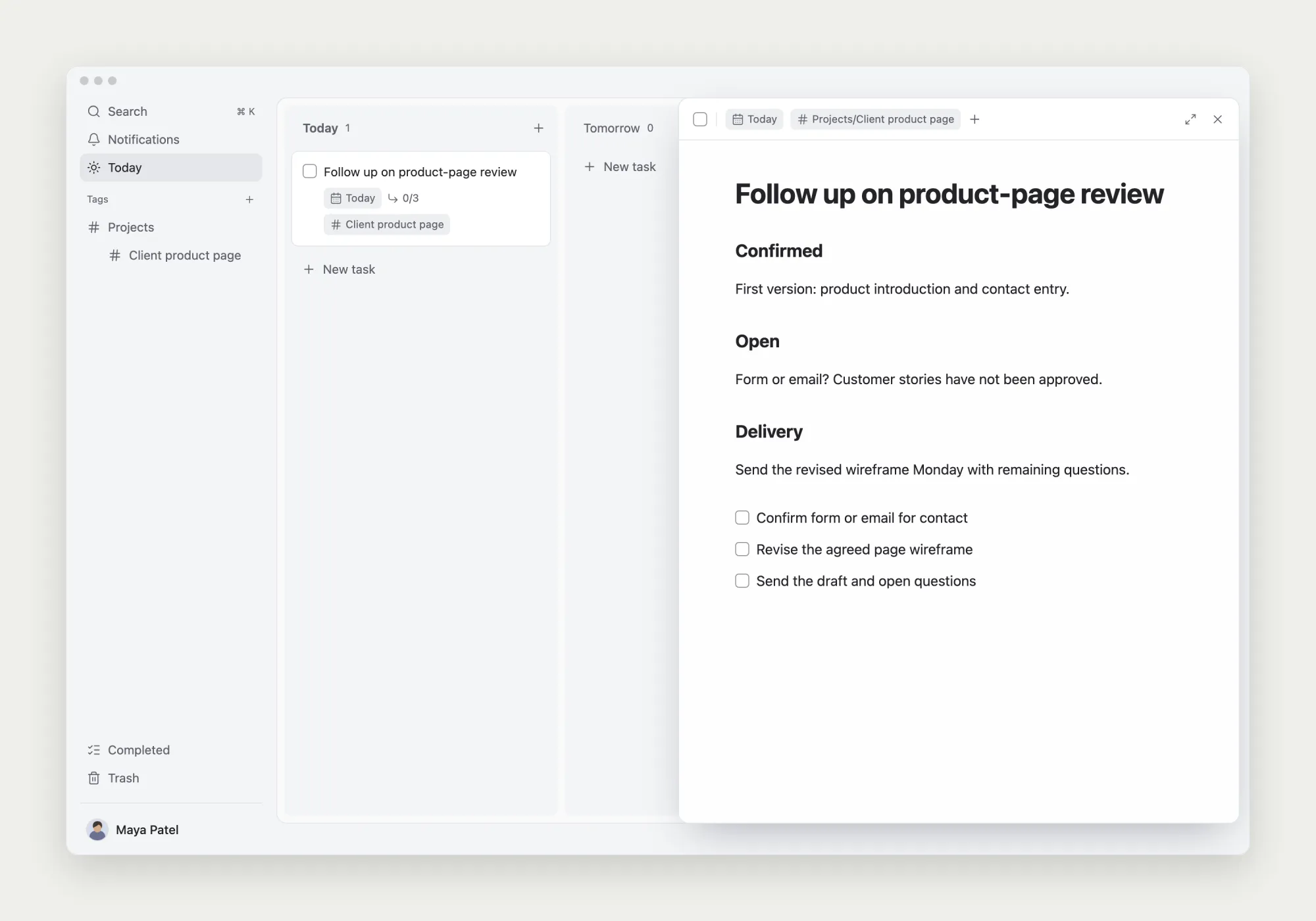
Write the owner, delivery requirement, and timing in the action record. When another person must decide something, record whom you will ask and the exact question. Put your own execution and follow-up steps into TodoNote subtasks.
The parent review task keeps the meeting context. Its subtasks move the work forward: confirm the contact option, revise from the answer, and send the updated draft with remaining questions. You can return to both the reasoning and the next steps from the same task.
A meeting minutes template to copy
Remove fields you do not need rather than transcribing every contribution. Establish the owner and result for each action. If an owner or date is unresolved, label it as awaiting confirmation and plan the clarification.
Meeting minutes | Topic and date:
Participants:
Decision needed from this meeting:

Confirmed decisions
- Decision, scope, and constraints:
- Supporting material or reason:

Open questions
- Question and its effect:
- Who can confirm it:
- Who will follow up, and when:

Actions
- Owner:
- Specific action and deliverable:
- Completion condition:
- Planned start and delivery date:
- Dependencies and source:

Ideas not adopted or left for discussion
- Idea and reason to keep it:| Action | Owner | Done when | Planned start |
|---|---|---|---|
| Confirm form or email for the contact entry | Maya Patel | The client’s choice is recorded in the review note | Today |
Schedule work in dependency order
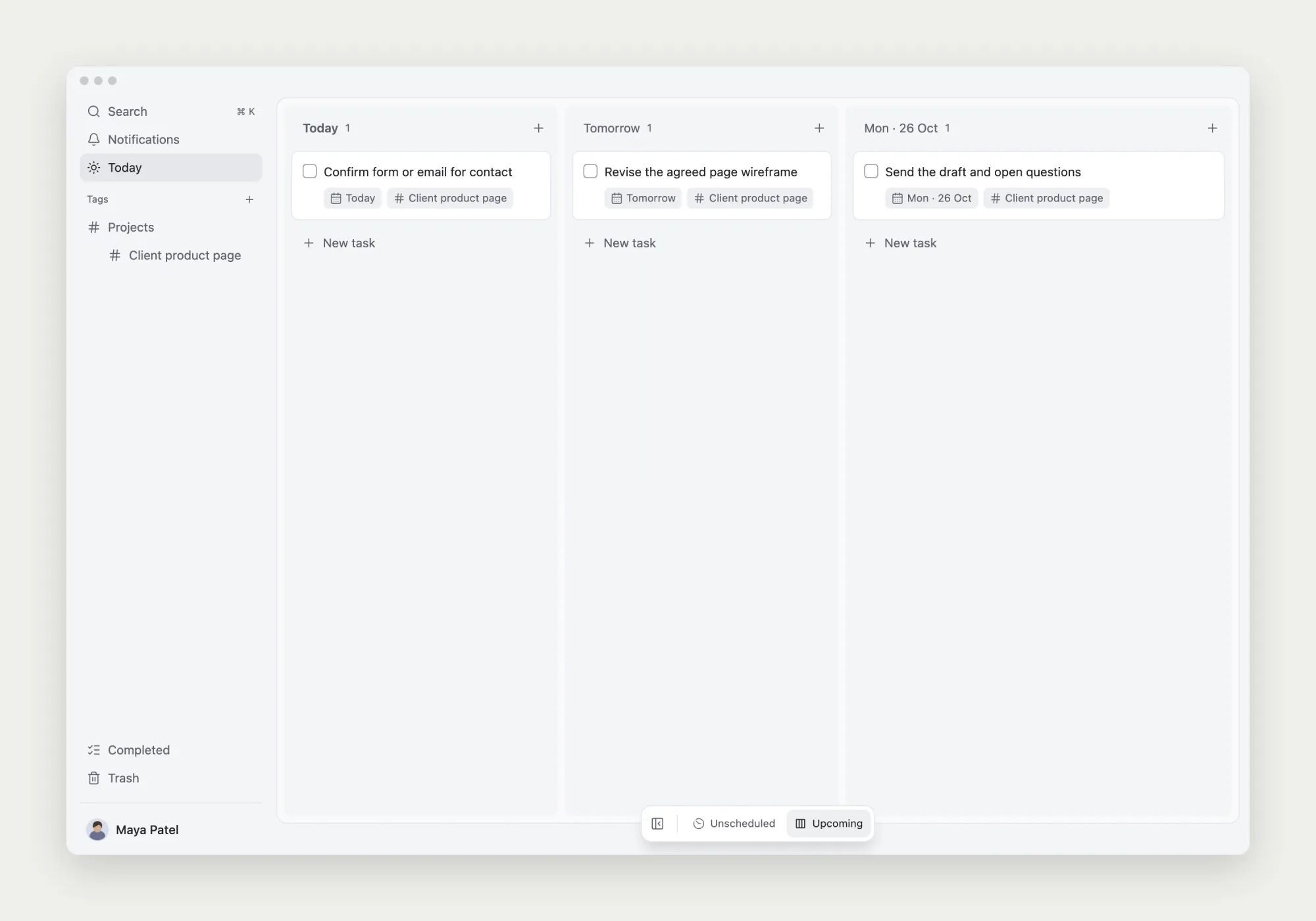
Ask about the contact option today, plan the wireframe revision for tomorrow if the answer arrives, and send the updated draft on Monday. If the answer is delayed, reconsider the revision and delivery dates and communicate the effect. Do not treat an unanswered question as an approved choice.
In TodoNote, use a start date for the work you intend to begin and a due date for an actual delivery requirement. While waiting on someone, schedule the action of asking or checking for a reply. That gives you something specific to do when the date comes.
The suggested customer-stories section stays outside this delivery. If you later decide to evaluate it, create a task with its own scope and result. A suggestion should become a commitment through an explicit decision.
Connect the outcome to the original decision
After sending the revision, keep the draft location, delivery time, and remaining questions with the relevant task. Start the next discussion from those records to distinguish delivered work from work still waiting for input.
Finishing “send the revised draft” does not establish client acceptance. Confirming the contact option does not establish that the page is live. Complete each action against its own agreed result, and leave a next step for work that continues.
Further reading: Atlassian’s action-item guide discusses ownership, outcomes, and sources. This example applies those questions to an individual’s follow-up work after a client review.